Burn Minotari for TARI
Covered in this guide
Section titled “Covered in this guide”- Burning Minotari (L1) to your Ootle account with
minotari_console_wallet. - Letting the Ootle wallet daemon claim it as TARI (L2).
- Doing the same from a script or AI agent over gRPC and JSON-RPC.
For how a claim is verified on-chain, see How Burn Claims Work.
How it works
Section titled “How it works”
minotari_console_walletburns Minotari to your Ootle account’s public key.- Once the burn is confirmed, it writes a burn proof JSON file to a shared directory.
- The Ootle wallet daemon watches that directory and submits the claim automatically once it is claimable.
1 Minotari burned = 1 TARI claimed, less the Ootle fee for the claim transaction.
Before you start
Section titled “Before you start”- A funded
minotari_console_wallet. - A running Ootle wallet daemon with an account.
- Both on the same network (e.g.
minotari_console_wallet --network esmeralda,tari_ootle_walletd --network esme). - Ideally both on the same machine, so they share the burn proof directory with no extra setup.
Burn and claim (manual)
Section titled “Burn and claim (manual)”-
Copy your Ootle account public key.
In the wallet daemon web UI (
http://localhost:5100), open your account and copy the Public Key column under account details. This is a 64-character hex string, not theotl_…address.
-
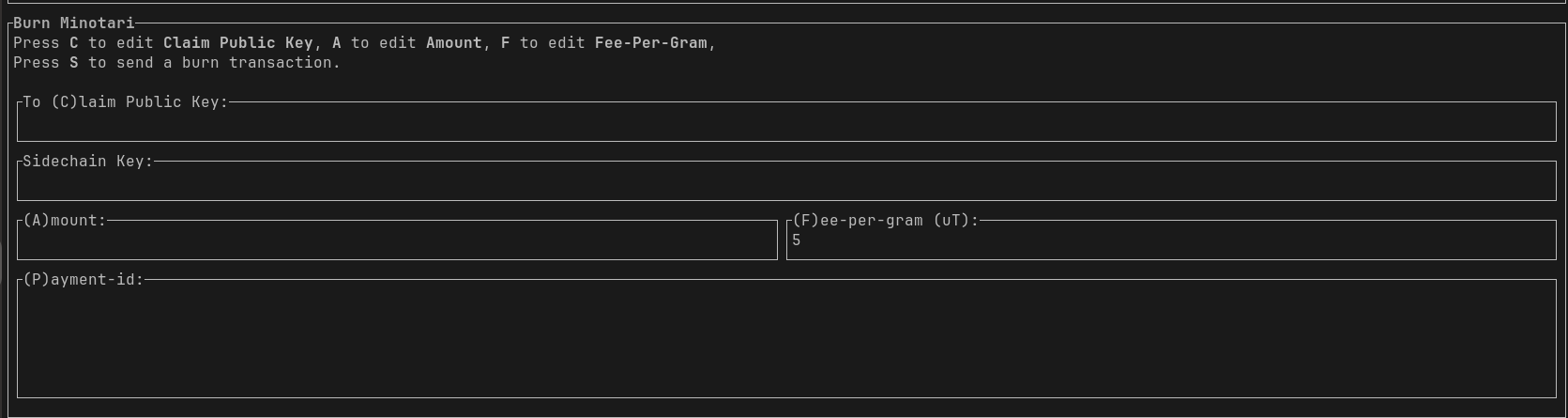
Open the Burn tab in
minotari_console_wallet.Press Tab until the Burn tab is selected.
-
Fill in the form.
Key Field Value CClaim Public Key The public key from step 1 Sidechain Key Leave empty. Empty means the Ootle. AAmount 10Tfor 10 Minotari. A bare number is µT (10000000).FFee-per-gram Keep the default ( 5) unless the network is busyPPayment-id Optional memo Press Enter to move to the next field.
-
Send. Press S, then y to confirm.
-
Wait for the claim.
Once the burn is confirmed on L1,
minotari_console_walletwrites the proof file and the daemon picks it up. The TARI appears in your account balance after the confirmation window (see above).
Claiming by hand
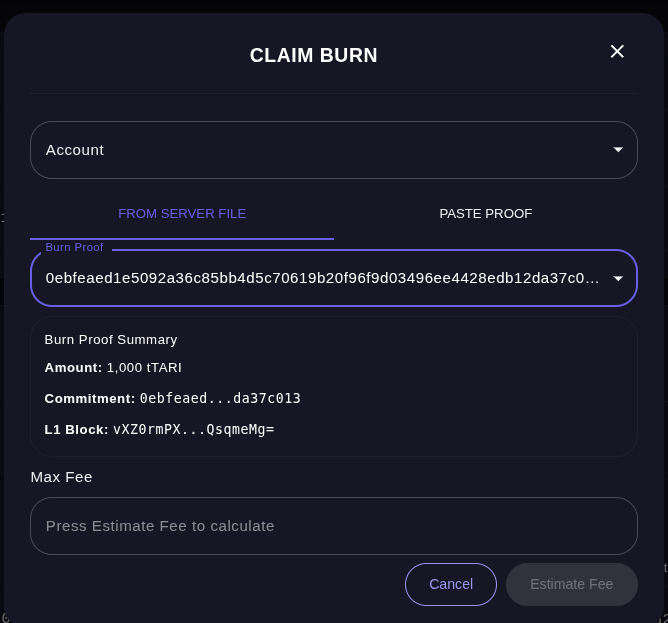
Section titled “Claiming by hand”If auto-claim is off, or the wallets are on different machines, claim from the daemon web UI:
- Click Claim Burn on your account page.
- Pick the account, then the proof under From server file. Use Paste proof instead to paste the contents of a proof file copied from another machine.
- Check the Burn Proof Summary, click Estimate Fee, then Claim Burn.
Where the proof files live
Section titled “Where the proof files live”Both wallets default to the same directory:
| OS | Path |
|---|---|
| Linux | ~/.local/share/tari/<network>/burn_proofs/ |
| macOS | ~/Library/Application Support/tari/<network>/burn_proofs/ |
| Windows | %APPDATA%\tari\<network>\burn_proofs\ |
<network> is the long name, e.g. esmeralda or mainnet. Claimed proofs move to a claimed/ subdirectory.
To use a different directory, set it on both sides:
minotari_console_wallet -p wallet.transactions.burn_proof_output_dir=/path/to/burn_proofstari_ootle_walletd -p ootle_wallet_daemon.burn_proof_dir=/path/to/burn_proofsFor scripts and AI agents
Section titled “For scripts and AI agents”An agent can do everything above through minotari_console_wallet’s gRPC API and the daemon’s JSON-RPC API. The steps
below are written so an agent can follow them directly: check each one, fix config where needed, then call the APIs
or hand the user the exact command to run.
1. Enable Minotari wallet gRPC
Section titled “1. Enable Minotari wallet gRPC”gRPC is off by default. Either start the wallet with the flag:
minotari_console_wallet --network esmeralda --enable-grpcor set it under [wallet] in minotari_console_wallet’s config (default ~/.tari/<network>/config/config.toml):
[wallet]grpc_enabled = truegrpc_address = "/ip4/127.0.0.1/tcp/18143" # default: 18143 esmeralda, 18103 mainnet# Optional basic auth; if set, send it as an `authorization: Basic …` header#grpc_authentication = { username = "admin", password = "xxxx" }Restart minotari_console_wallet after editing the config. For an unattended wallet add --non-interactive and
--password <password> (or MINOTARI_WALLET_PASSWORD).
2. Check the daemon will auto-claim
Section titled “2. Check the daemon will auto-claim”Auto-claim is on by default. Confirm the daemon’s config does not set auto_claim_burns = false:
[ootle_wallet_daemon]auto_claim_burns = true#burn_proof_dir = "/path/to/burn_proofs" # only if not using the default3. Get the account public key
Section titled “3. Get the account public key”Call accounts.get_default on the daemon (http://localhost:5100/json_rpc, scope accounts:read) and read
account.owner_public_key. See API Keys for AI Agents for authentication.
curl -s http://localhost:5100/json_rpc \ -H "Authorization: Bearer $OOTLE_API_KEY" -H 'Content-Type: application/json' \ -d '{"jsonrpc":"2.0","id":1,"method":"accounts.get_default","params":{}}' \ | jq -r '.result.account.owner_public_key'4. Burn over gRPC
Section titled “4. Burn over gRPC”The wallet does not serve gRPC reflection, so point grpcurl at the protos in the Minotari repo
(applications/minotari_app_grpc/proto). bytes fields are base64 in grpcurl JSON.
PROTO=~/tari/applications/minotari_app_grpc/protoCLAIM_PK_B64=$(echo -n "$OWNER_PUBLIC_KEY_HEX" | xxd -r -p | base64)
grpcurl -plaintext -import-path "$PROTO" -proto wallet.proto \ -d "{\"amount\": 10000000, \"fee_per_gram\": 5, \"claim_public_key\": \"$CLAIM_PK_B64\"}" \ 127.0.0.1:18143 tari.rpc.Wallet/CreateBurnTransaction| Field | Value |
|---|---|
amount | µT to burn (10000000 = 10 Minotari) |
fee_per_gram | L1 fee rate; 5 is a sensible default |
claim_public_key | Ootle account public key (32 bytes) |
sidechain_deployment_key | Omit. Empty means the Ootle. |
payment_id | Optional memo bytes |
Check is_success in the response, and keep commitment: it identifies the burn.
5. Wait for the proof
Section titled “5. Wait for the proof”Poll GetBurnClaimProof with the commitment. merkle_proof is absent until the burn is mined and confirmed.
grpcurl -plaintext -import-path "$PROTO" -proto wallet.proto \ -d "{\"commitment\": \"$COMMITMENT_B64\"}" \ 127.0.0.1:18143 tari.rpc.Wallet/GetBurnClaimProofWhen it is present minotari_console_wallet has also written the proof file, and from here the daemon claims it with no
further calls.
6. Track the claim
Section titled “6. Track the claim”List proofs the daemon can see (scope burn_proofs:read). A proof still listed has not been claimed yet:
curl -s http://localhost:5100/json_rpc \ -H "Authorization: Bearer $OOTLE_API_KEY" -H 'Content-Type: application/json' \ -d "{\"jsonrpc\":\"2.0\",\"id\":1,\"method\":\"burn_proofs.list\",\"params\":{\"filter_by_public_key\":\"$OWNER_PUBLIC_KEY_HEX\"}}"To claim by hand instead (auto-claim off, or it gave up), call accounts.claim_burn (scope transfer:create).
Run it with is_dry_run: true first to get required_fees, then submit with that as max_fee:
{ "jsonrpc": "2.0", "id": 1, "method": "accounts.claim_burn", "params": { "account": { "Name": "default" }, "claim_proof": { "FromFile": { "file_name": "<public key>-<commitment>.json" } }, "max_fee": 2000, "is_dry_run": true }}A dry run whose rejection carries the code NotYetValid means the burn is valid but still inside the confirmation
window. Try again later. Branch on the code rather than the message, which is free to change.
Troubleshooting
Section titled “Troubleshooting”| Symptom | Fix |
|---|---|
| No proof file appears | The burn is not confirmed yet. Check the Burn tab in minotari_console_wallet. |
| Proof file exists, daemon ignores it | Different directory or network. Compare the paths above. |
Claim rejected, code NotYetValid | Wait. The daemon retries on its own. |
| Claim rejected: ownership proof fails | Wrong claim key or a sidechain key was set. The burn cannot be claimed and the funds are lost. |
gRPC connection refused | gRPC not enabled, or wrong port for the network. |