Publishing Templates
Covered in this guide
Section titled “Covered in this guide”In this guide, you will:
- Compile your Rust template into a WebAssembly (WASM) binary.
- Understand the process of deploying templates to the Tari Ootle network.
- Learn how to use the Tari Ootle Walletd to publish your template.
This guide assumes you have already read Templates Overview.
Compiling Your Template
Section titled “Compiling Your Template”To publish your template, you first need to compile it to WebAssembly (WASM).
Run the following command in your terminal:
cargo build --target wasm32-unknown-unknown --releasePublishing Your Template
Section titled “Publishing Your Template”To publish your template, you need to create a transaction that includes the PublishTemplate instruction.
This transaction will deploy your compiled WASM template to the Tari Ootle network.
Using the Tari Ootle Wallet Web UI
See Set up a Wallet if you have not already set one up. Ensure it is running before starting.
Click on “Publish Template” in the top right corner of the wallet web UI on the “Home” page.
You should see a dialogue like the one below:
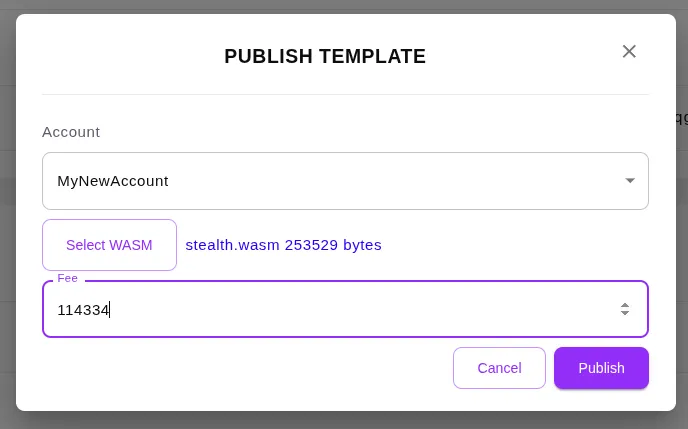
In this dialogue:
- Select the fee account containing
tXTM(testnet Tari) to pay for the transaction fees. - Upload the compiled WASM file of your template. You can find this file in the
target/wasm32-unknown-unknown/release/{name}.wasmdirectory of your crate project after running the build command. - Click “Estimate Fee” to calculate the estimated transaction fee. This will automatically fill in the fee field with the amount of
tXTMrequired to publish your template. - Click “Publish Template” to submit the transaction and deploy your template to the network.
After the transaction is confirmed, your template will be published and available for use on the Tari Ootle network. You can view your published templates, including the addresses which we’ll need later, by navigating to “Templates” in the left sidebar of the wallet web UI.
What we did:
- We compiled our Rust template to WebAssembly (WASM) using Cargo.
- We used the Tari Ootle Wallet web UI to publish our compiled template to the Tari Ootle testnet
Now that your template is published, it’s ready to be used in transactions!
Next Steps
Section titled “Next Steps”- Learn some basics about Ootle transactions.
- Learn how to programmatically interact with the guessing game template.